 BG Remove Pro
 Background Removal Tests: Portraits, Products and Difficult Edges
Eight real images tested in Fast and High quality modes, with original-size PNG downloads, visible failures, and separate model-loading and processing times.
We tested eight images in both BG Remove Pro modes on November 16, 2026. All 16 runs produced a transparent PNG at the input image's pixel dimensions. That does not mean all 16 cutouts were usable. Fast mode removed part of the headphones, both modes left problems around fine hair, and High quality kept an unwanted color chart beside a glass bottle.
High quality recovered the headphones and removed much of the sneaker's leftover background. It also kept more of a detailed botanical illustration. Below you can inspect every selected case, including the unsuccessful results, and open the unretouched PNG files.
These are our own small-sample product tests using the current local application code. They are not an independent benchmark, a test of every browser, or measurements of the deployed website's complete upload-to-download experience.
What we tested
We fixed the selection before running either mode: two portraits, two pets, two products, one botanical illustration, and one glass bottle. The files came from our existing Wikimedia Commons test collection. Their actual input dimensions are listed below; some are Commons thumbnail versions rather than the photographer's largest original.
| Setting | This test |
|---|---|
| Date | November 16, 2026 |
| Computer | Apple M5 Pro, approximately 48 GiB physical memory, macOS Darwin 25.5.0, arm64 |
| Browser | Ego Lite, Chromium 156.0.0.0 |
| Execution | Browser WebAssembly, one inference thread; no WebGPU |
| Fast | MODNet FP16 |
| High quality | BiRefNet Lite 512 FP16 |
| Images and runs | 8 fixed images × 2 modes, plus 3 repeated portrait runs per mode |
| Review | Team review of complete images, white/black/checkerboard composites, and matching 320 × 320 pixel crops |
The isolated local test page ran the application's current processing Worker. Its module imports and JSON loading were adapted for the test server; the image decoding, model inputs, masks, alpha composition, and PNG encoding were unchanged. Model files came through the configured remote delivery path and its integrity checks. This measures that processing pipeline, rather than every interaction in the website UI.
We did not manually repair edges, replace masks, or use another tool to create these outputs. The comparison previews are resized for display; the detail images use matching crops at their original pixel scale. Preview backgrounds and labels are presentation aids. Downloadable PNGs retain real alpha transparency and do not contain a baked-in checkerboard.
Original dimensions, real output sizes, and processing times
Output dimensions matched input dimensions for both modes in every case. Each output decoded as PNG with an alpha channel. Exact byte counts appear with each case's downloads and in the linked measurement summary.
| Case | Input/output pixels | Fast | High quality |
|---|---|---|---|
| Curly-haired portrait | 1280 × 1920 | 1.19 s | 5.47 s |
| Hair in wind | 1280 × 853 | 1.07 s | 5.03 s |
| Long-haired cat | 3872 × 2592 | 1.25 s | 5.28 s |
| Rabbit on grass | 1280 × 719 | 1.22 s | 5.02 s |
| Sneaker and laces | 1920 × 1287 | 1.04 s | 5.06 s |
| Headphones | 1920 × 1277 | 1.09 s | 5.05 s |
| Botanical illustration | 1280 × 2154 | 1.19 s | 5.17 s |
| Glass bottle | 1920 × 1275 | 1.09 s | 5.19 s |
Processing times start after the model session is initialized and include image decoding, preprocessing, inference, mask composition, and PNG encoding inside the Worker. The portrait in the first row is each mode's first inference. These single observations are not speed guarantees. Initial model loading is reported separately below.
Keeping the pixel dimensions preserves the output canvas size. It does not mean that every input detail survives segmentation, or that a 512-pixel model internally examines every original pixel at full resolution.
Portraits: the outline is easier than every strand of hair
Curly-haired portrait
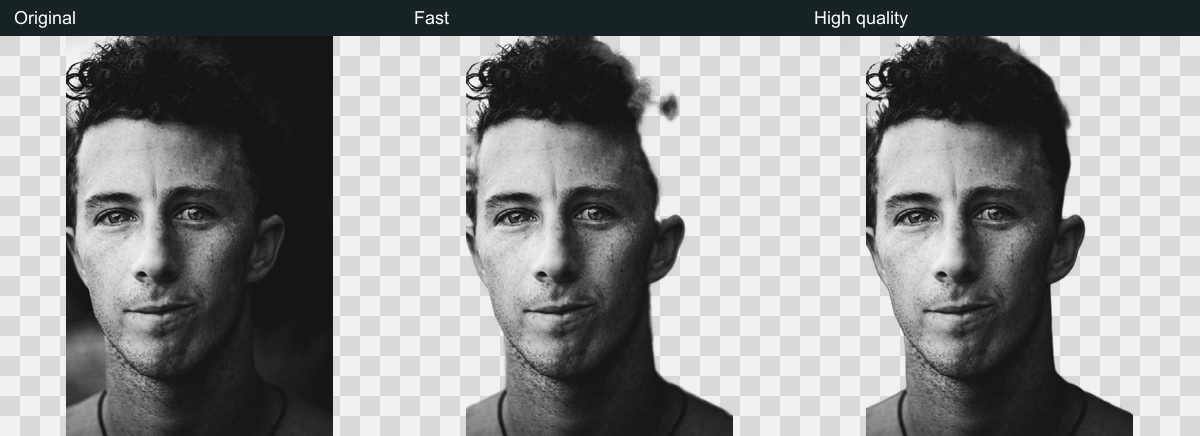
Both modes retained the face and main silhouette. Fast left a detached dark patch near the upper-right hair edge and softened parts of the boundary. High quality removed that patch and gave a more coherent outline, though individual curls against the dark source background still need inspection.
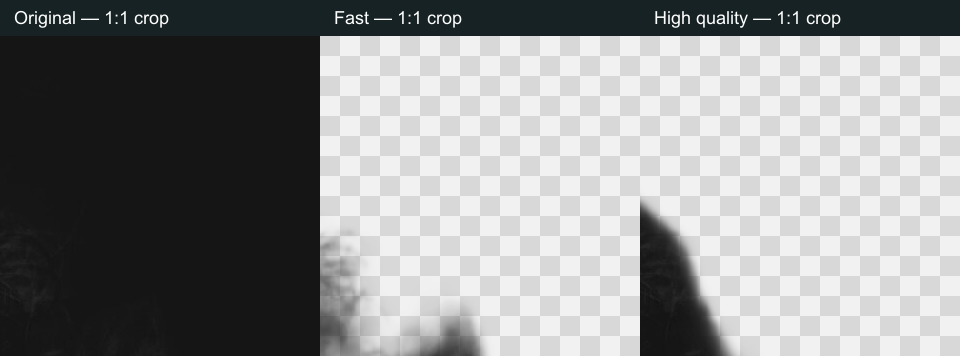
PNG sizes: Fast 2,069,833 bytes; High quality 1,952,829 bytes.
Test input JPG · Fast PNG · High quality PNG
Hair in wind
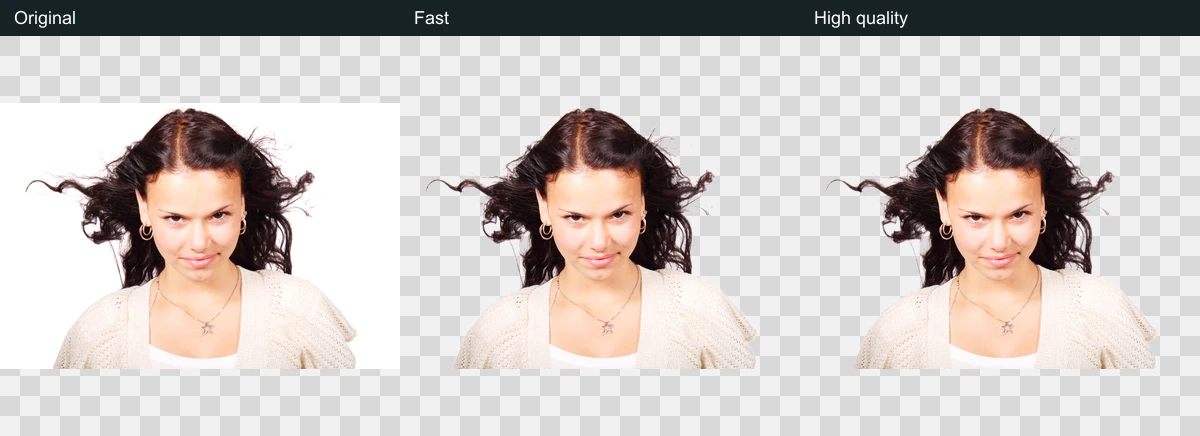
Both modes retained the person and larger hair strands. Pale fringes remain around fine hair, especially when the result is placed over black. The improvement is less decisive here than in the product examples. A clean-looking preview on white can hide these fringes.
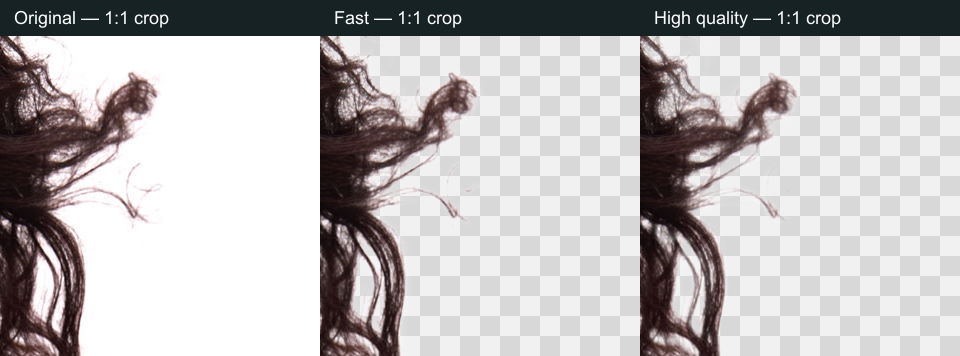
PNG sizes: Fast 1,236,029 bytes; High quality 1,193,053 bytes.
Test input JPG · Fast PNG · High quality PNG
Pets: inspect the fur boundary and the ground
Long-haired cat
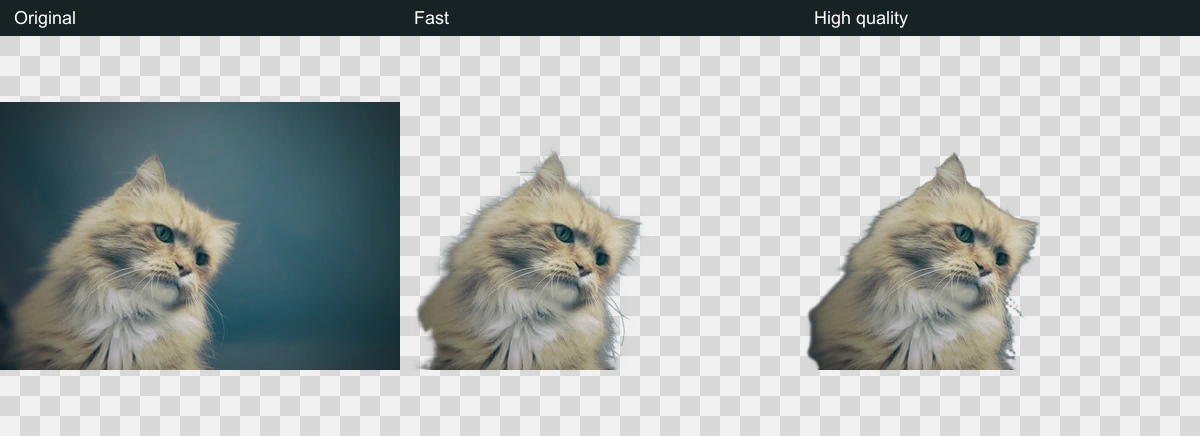
Both modes removed most of the blue background while retaining the cat's face and body. Fine fur is softened, and some wispy edges are faint or missing. The matched crop shows that neither output reproduces every isolated strand. This is a useful case for checking the result at its intended presentation size before deciding whether to use it.
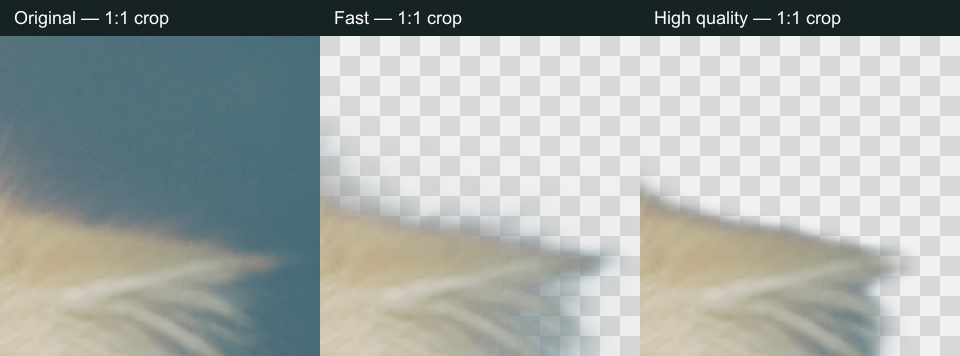
PNG sizes: Fast 6,526,458 bytes; High quality 6,186,429 bytes.
Test input JPG · Fast PNG · High quality PNG
Rabbit on grass
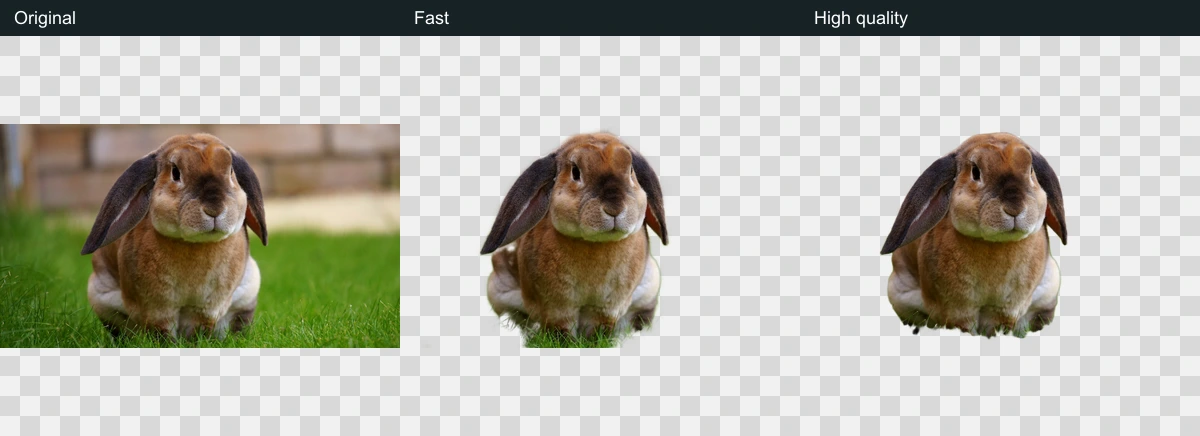
Fast kept a visible patch of grass around the feet. High quality removed more of it, but the lower edge remains uneven and a few green blades survive. The face and ears are recognizable in both outputs; the contact area with the ground is the part that needs closer review.
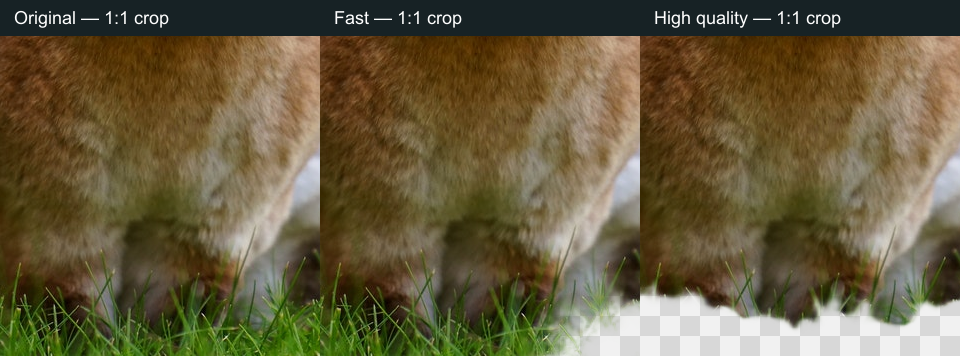
PNG sizes: Fast 765,768 bytes; High quality 672,973 bytes.
Test input JPG · Fast PNG · High quality PNG
Products: two clear reasons to inspect or retry Fast mode
Sneaker and laces
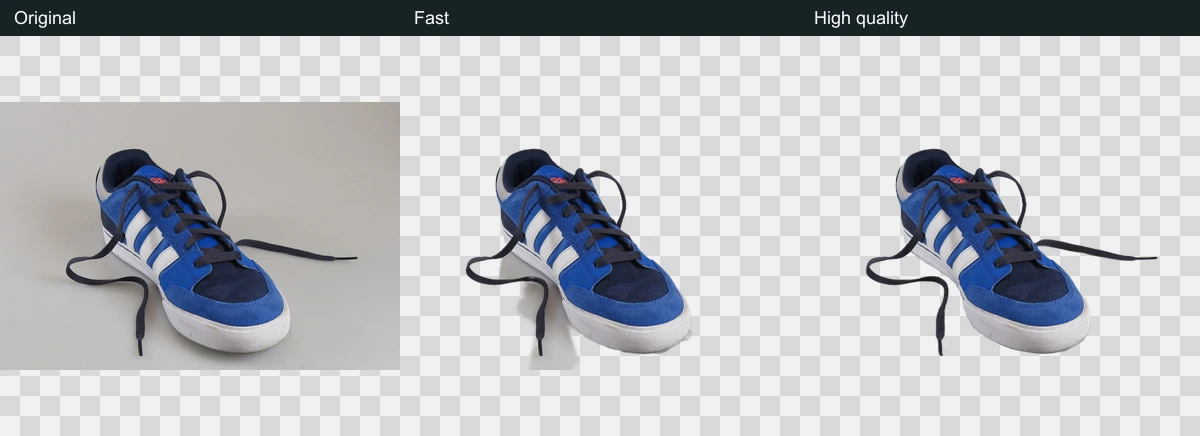
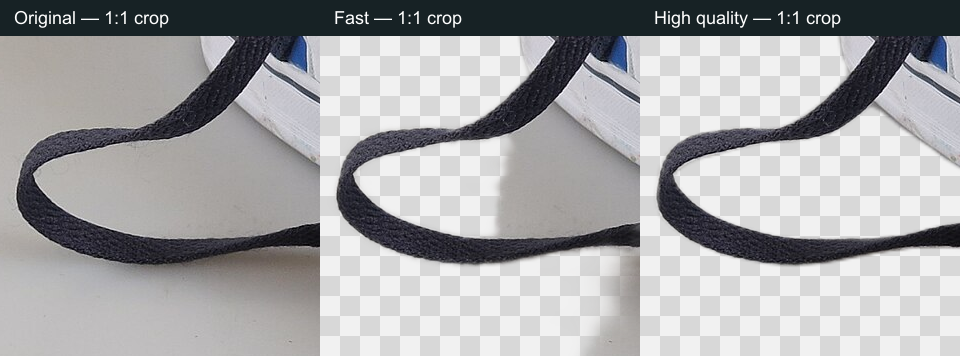
Fast retained a broad patch of the pale surface under the left lace and omitted the long lace extending to the right. High quality retained that right lace and cleared more of the surface inside and below the left loop. This particular image shows a practical benefit from retrying the same original in High quality mode.
PNG sizes: Fast 1,569,840 bytes; High quality 1,449,721 bytes.
Test input JPG · Fast PNG · High quality PNG
Headphones: an obvious failed Fast cutout
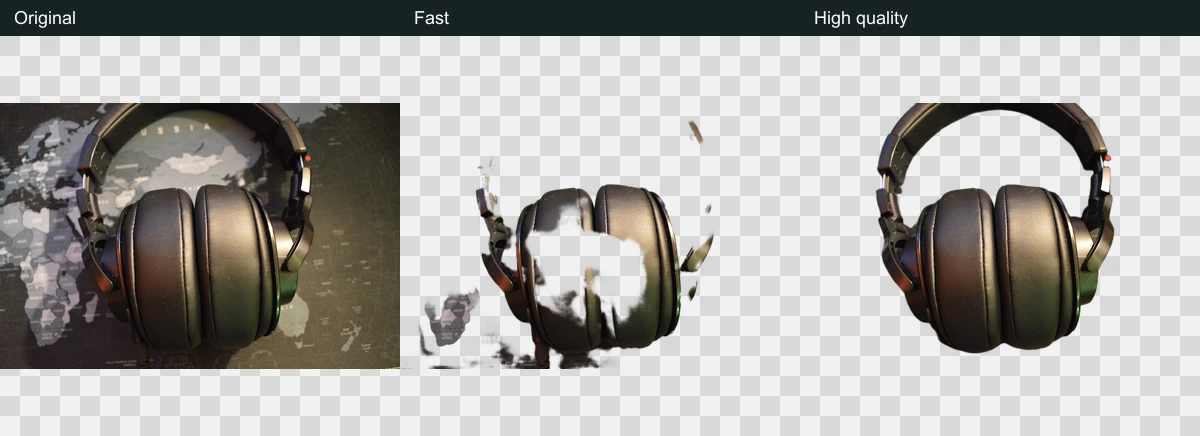
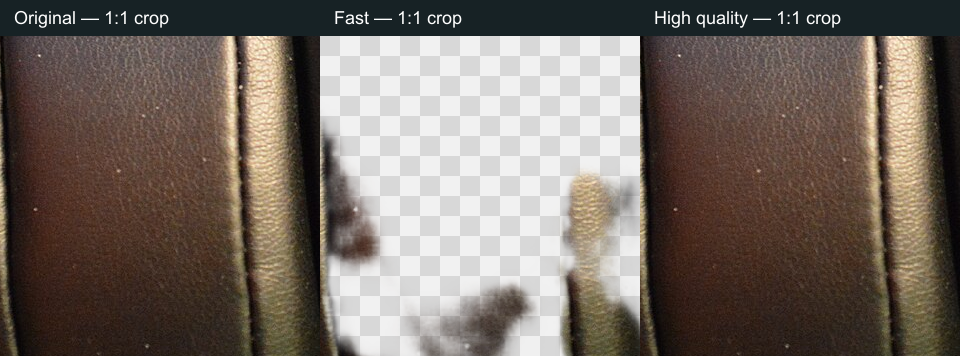
Fast made a large transparent hole in an ear cup, removed much of the headband, and retained pieces of the map underneath. We would not use that result. High quality retained the ear cups and headband and removed most of the surrounding map. The detail crop makes the subject deletion in Fast easy to verify.
PNG sizes: Fast 1,624,307 bytes; High quality 1,885,169 bytes.
Test input JPG · Fast PNG · High quality PNG
Difficult cases: fine illustrations and glass
Botanical illustration
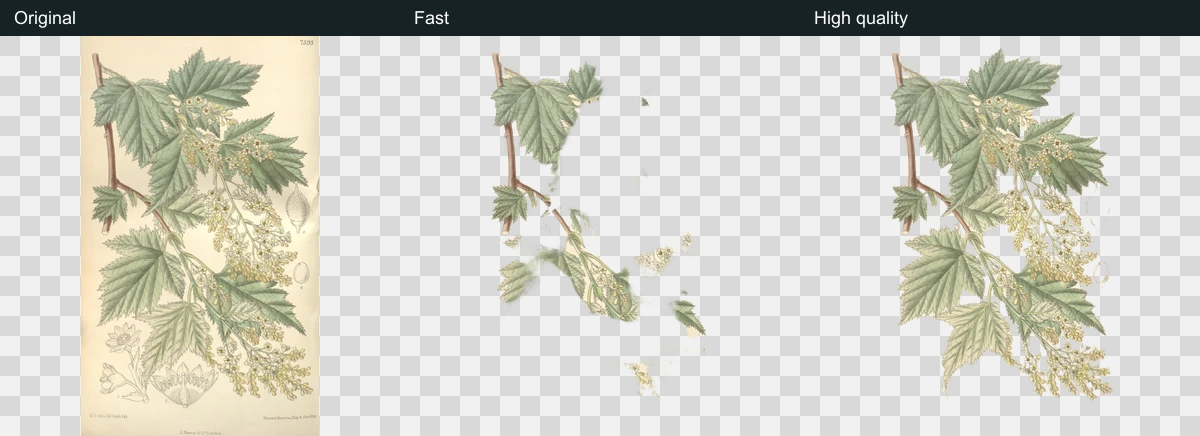
Fast removed substantial sections of the plant, including many fine flowers and stems. High quality retained much more of the colored branch, but pale paper remains inside some small gaps. The plate's separate line drawings and printed labels also disappear. If the intended subject is the entire scientific plate, neither mode preserves it intact.
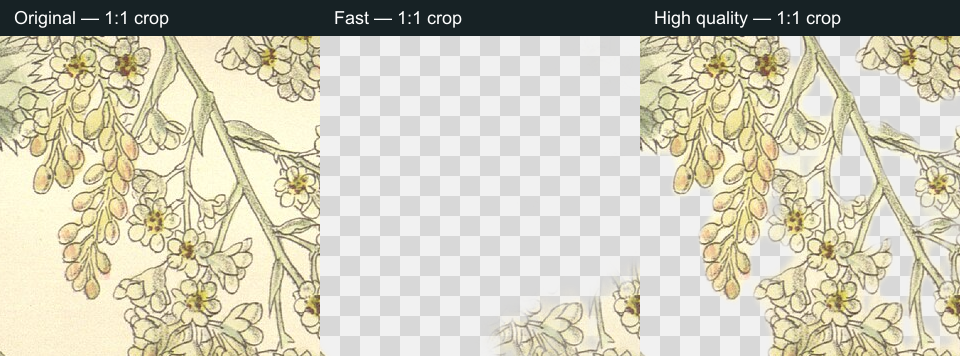
PNG sizes: Fast 2,022,624 bytes; High quality 4,104,944 bytes.
Test input JPG · Fast PNG · High quality PNG
Glass bottle: High quality also keeps an unwanted object
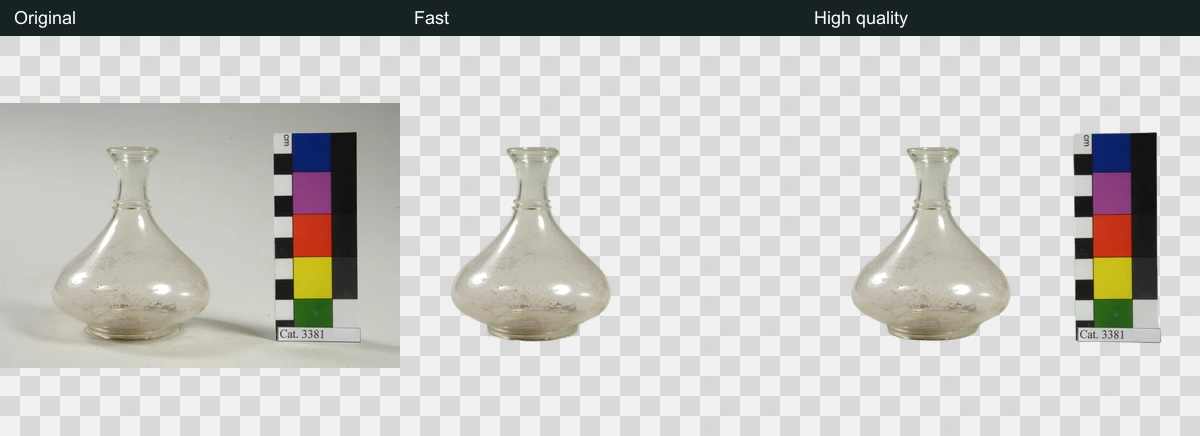
Fast removed the surrounding background and the color chart. High quality retained the chart as a second foreground object. If your intended subject is only the bottle, that is an unwanted result despite the mode's name.
In both outputs the bottle body still looks largely filled with its original pale appearance rather than showing the new background naturally through the glass. An alpha channel around a bottle is not evidence that its optical transparency has been recovered. This case would need further editing for convincing placement over a different scene.
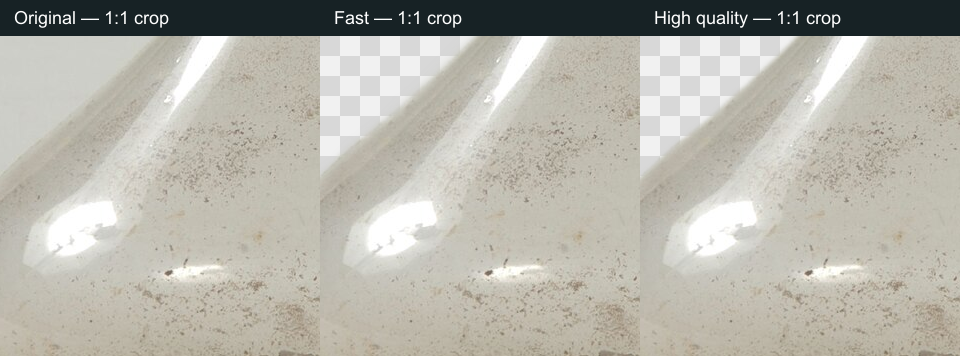
PNG sizes: Fast 731,884 bytes; High quality 1,204,444 bytes.
Test input JPG · Fast PNG · High quality PNG
Model loading is separate from processing
We started on a new local test origin with no Cache Storage entries. Fast was tested first. High quality then downloaded its own model files while reusing the runtime files cached by Fast. We did not clear the browser's shared HTTP cache, so these are empty application-cache observations, not a claim that every network layer was cold.
| Measurement | Fast | High quality |
|---|---|---|
| Weight file size, excluding runtime/configuration | 12,984,781 bytes | 98,484,532 bytes |
| First observed load and initialization | 8.03 s, including shared runtime acquisition | 20.43 s, shared runtime already cached |
| First image after initialization | 1.19 s | 5.47 s |
| Same portrait repeated, run 1 | 1.084 s | 5.263 s |
| Same portrait repeated, run 2 | 1.084 s | 5.137 s |
| Same portrait repeated, run 3 | 1.087 s | 5.068 s |
| Median of those three repeats | 1.084 s | 5.137 s |
| New Worker, files already in application cache: initialization only | 0.25 s | 2.35 s |
The two first-load observations have different runtime-cache states and should not be treated as a controlled download-speed comparison. A new cached Worker still has to verify files and create a model session. We observed no external asset fetches during those cached initialization checks, but that does not guarantee a browser will retain its cache forever.
The homepage can preload Fast mode before an image is selected. Its upload-time wait therefore need not equal the isolated initialization measurement. Network conditions, CPU, browser, power state, and competing work can change these times. We did not test a real phone, Safari, or an offline revisit in this run, and three repeats do not establish a performance SLA.
How to use these results
Try the background remover with your own image and inspect the subject before downloading. If Fast removes part of an object or leaves a broad background patch, retry the same input in High quality and compare both results. The headphones and sneaker show why that can help; the glass bottle shows why it is not an automatic improvement.
Check hair, fur, fine openings, and ground contact at a useful zoom level. Place the result on both a light and dark background. For more about recognizing actual alpha transparency, see the PNG background remover guide.
These eight files have no reference alpha masks, so we report visible observations rather than accuracy percentages. We have not established that the images were absent from model training data. Sample selection, review, and writing were performed by the product team. The findings describe these images and this device; they do not establish performance for every portrait, product, or transparent object.
Sources and downloadable measurements
The following source pages were checked on November 16, 2026. Credits identify the source works; they do not imply endorsement of BG Remove Pro. The article's original-size inputs are the exact files used in this test, not a claim to be the largest files available at the source.
- Curly-haired portrait: Jeremy Bishop, Wikimedia Commons source, CC0.
- Hair in wind: Petr Kratochvil, Wikimedia Commons source, CC0.
- Long-haired cat: dorota dylka, Wikimedia Commons source, CC0.
- Rabbit: Mike Bird, Wikimedia Commons source, CC0.
- Sneaker: Amsterdam Museum collection; source credits Adidas as manufacturer, Wikimedia Commons source, Public Domain Mark.
- Headphones: P0lykey, Wikimedia Commons source, CC0.
- Botanical plate: Matilda Smith and J. N. Fitch, Wikimedia Commons source, public domain; source marking.
- Glass bottle: Museo Egizio, credited as source/photographer on the Wikimedia Commons source page, CC0.
Download the measurement summary and file hashes (JSON). It includes the exact model revisions, input/output sizes and hashes, alpha-channel counts, per-image processing times, and the repeated timing observations.