 BG Remove Pro
A Free remove.bg Alternative for Single Images: BG Remove Pro
When BG Remove Pro fits a one-image cutout task: no signup, local background removal, original-size transparent PNG downloads, and the limits to check.
BG Remove Pro is an option when you occasionally need one transparent cutout, want to avoid creating an account, and want the background-removal step to run on your own device. Select one image up to 10 MB, process it in the browser and download a transparent PNG at the input pixel dimensions, without a watermark or a paid export step.
Open the free background remover.
This guide is written by the BG Remove Pro team. It explains that specific workflow and its boundaries; it is not an independent comparison of segmentation quality.
What changed at remove.bg
On November 16, 2026, the official remove.bg FAQ states that its background-removal functionality is moving into Canva. The announcement does not establish a migration date or the status of every account, API or integration, so check the current official information for your workflow.
Canva's current background-remover page describes an upload-based workflow, may prompt users to log in or create an account, and offers a limited number of free high-resolution downloads before a paid plan is required for unlimited downloads. It also describes erase/restore refinement, bulk removal and a broader design editor. We do not assume an exact free quota, price or legacy remove.bg entitlement from that page.
Compare the task you actually need to finish
| Decision | BG Remove Pro | Canva's current background-remover page |
|---|---|---|
| Start a one-image cutout | No account required | May prompt for login or account creation |
| Free export | Transparent PNG at input pixel dimensions; no watermark or paid export step | Limited free high-resolution downloads; check current terms |
| Where the selected photo goes | Background removal runs locally in the browser | Image-upload workflow |
| Reuse in a presentation | Download the PNG and insert it into your slide editor | Download a PNG or continue in the Canva editor |
| Manual edge refinement | No dedicated erase/restore brush in this remover | Erase and restore tools described |
| Many images or a complete design | This remover accepts one image at a time | Bulk removal and design editing described |
Canva entries above are based on its official page checked on November 16, 2026, not a hands-on test of every account or plan. BG Remove Pro entries reflect the current application implementation and the linked tests. If you depend on an API, integration, batch workflow or team library, evaluate those requirements separately before changing tools.
What “original size” means here
The transparent PNG keeps the selected input file's width and height. That describes its output canvas, not the quality of every boundary. Hair, glass, thin cables and low-contrast edges can lose detail or retain unwanted background. More output pixels do not repair an incorrect mask.
Our eight-image background-removal tests show original files and both processing modes, including failures. In the headphone example, Fast mode deletes part of the subject. In the sneaker example, High quality retains more of a lace and removes more leftover surface than Fast.
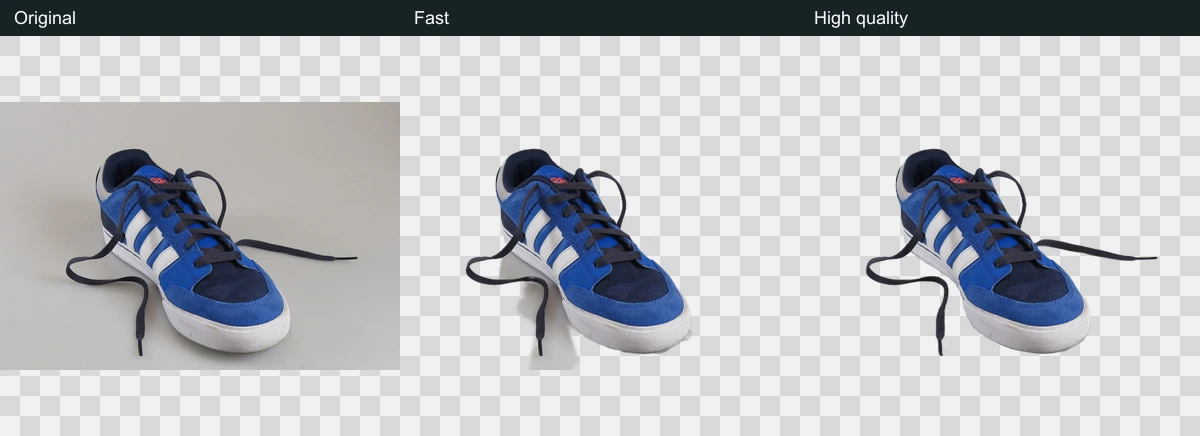
The sneaker input and High quality output are both 1920 × 1287 pixels. You can inspect the test input JPG and unretouched transparent PNG. Photo source: Amsterdam Museum / Wikimedia Commons; the full test report includes source and reuse information. The comparison image contains display backgrounds; the downloadable PNG contains actual transparency.
A one-image workflow without signup
- Open the homepage tool and select a JPG/JPEG, PNG, WebP, GIF or BMP file up to 10 MB. HEIC is not accepted by this uploader. Animated output is not promised.
- Let the model load and run background removal. An initial visit may require a substantial model download. Time and available memory vary by device and image.
- Compare the result with the original. Try the other processing mode when useful, then inspect fine boundaries against both light and dark backgrounds.
- Download the transparent PNG. Keep the original and check the saved file's dimensions and appearance before using it.
For a presentation, insert the PNG as an image layer and place it over the slide's actual background. Check thin laces, pale edges, shadows and any missing parts at the size your audience will see. A checkerboard preview is not proof that an image will look clean on every background.
Local photos and website privacy are different questions
For background removal, the selected photo is decoded and processed in a browser Worker on your device. The website and model still need to load over the network. The website also includes analytics and advertising code; local image processing does not mean zero network requests or zero data collection.
The privacy policy distinguishes those activities. It also explains that the separate image format converter sends selected files to a server. Do not extend the background remover's local-processing claim to every tool on the site.
If the transparent PNG is too large
Transparent PNGs can be larger than the original photograph. Use the PNG compressor when the file already has the cutout you want and you need a smaller PNG. It keeps the pixel dimensions and supports alpha transparency, but palette quantization can alter colors and partly transparent edges. It has no lossless-only switch in the current interface and no guaranteed target size.
Download and inspect the compressed output rather than judging the original thumbnail. Keep PNG when transparency is required; JPEG cannot store an alpha channel. Meeting a file-size limit does not by itself ensure that an upload form accepts the format, dimensions or content.
When to choose another workflow
A local single-image remover is useful for occasional cutouts and a standalone transparent PNG. For a large catalog, manual mask painting, a production API, a shared asset library or a complete design environment, compare tools built for those requirements. The right choice depends on the task and on the actual edges in your photo, not only on a free-export label.
Sources and review date
Reviewed November 16, 2026. Product terms and interfaces can change.